
Features for Moderators
INFO
Users can be promoted to moderators by the Habitat administrator to help moderate posts and comments made by the community. Moderators have access to all of the features that regular users do, in addition to those described on this page.
User Moderation
WARNING
Most moderation actions create a public record in the moderation log. The moderator is often provided with the ability to state a reason for their action. This feature exists to encourage accountability and fair community moderation.
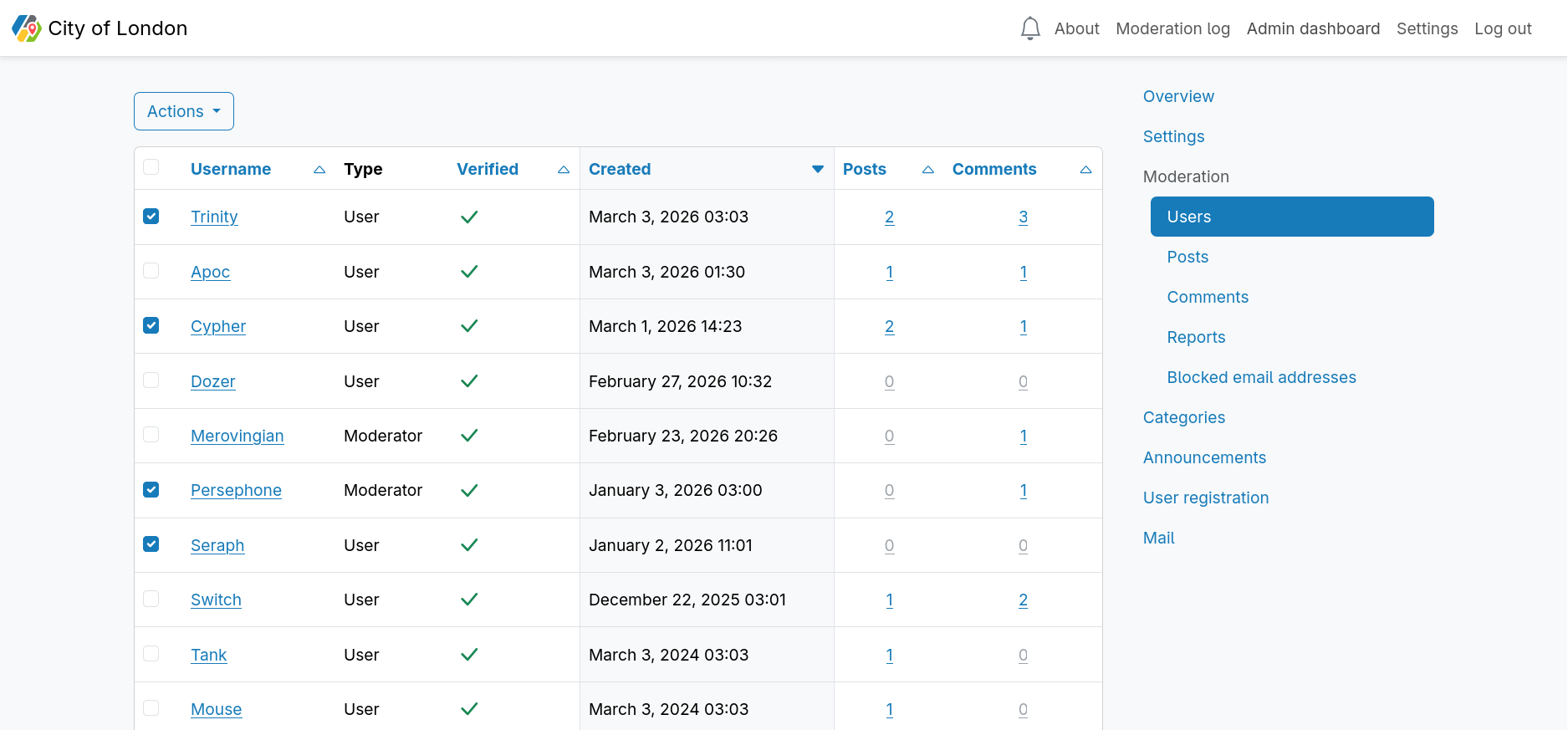
The users index displays a table of all users. This table is paginated at 10 users per page by default, and can be changed to display 25, 50 or 100 users per page.
Some columns of the users table can be sorted in ascending or descending order by clicking the column heading.
The users table displays the following information about each user:
| Column | Sortable | Description |
|---|---|---|
| Username | ✅ | |
| Type | ❌ | User, Administrator or Moderator. |
| Verified | ✅ | Displays whether a user has clicked the link in their verification email to verify that they own their email address. They will not be able to post or comment until they have. |
| Created | ✅ | Displays the date and time that the user account was created. |
| Posts | ✅ | Displays the number of posts the user has made. This links to the posts moderation index filtered by the user. |
| Comments | ✅ | Displays the number of comments the user has made. This links to the comments moderation index filtered by the user. |
Freezing user accounts
It is possible for moderators and administrators to freeze a user account for a specified amount of time. When a user account is frozen, the user will be unable to create a post or comment. It is also possible for administrators and moderators to unfreeze a user account early. Once the user account is unfrozen, they can create posts and comments as normal.
Banning user accounts
DANGER
Banning user accounts deletes all user information, including their posts, hearts and comments. It is permanent and cannot be undone.
When a user account is banned, it is permanently deleted. All posts and comments made by that user are also permanently deleted. The email address of the user is automatically added to the blocked email addresses list.
Post Moderation
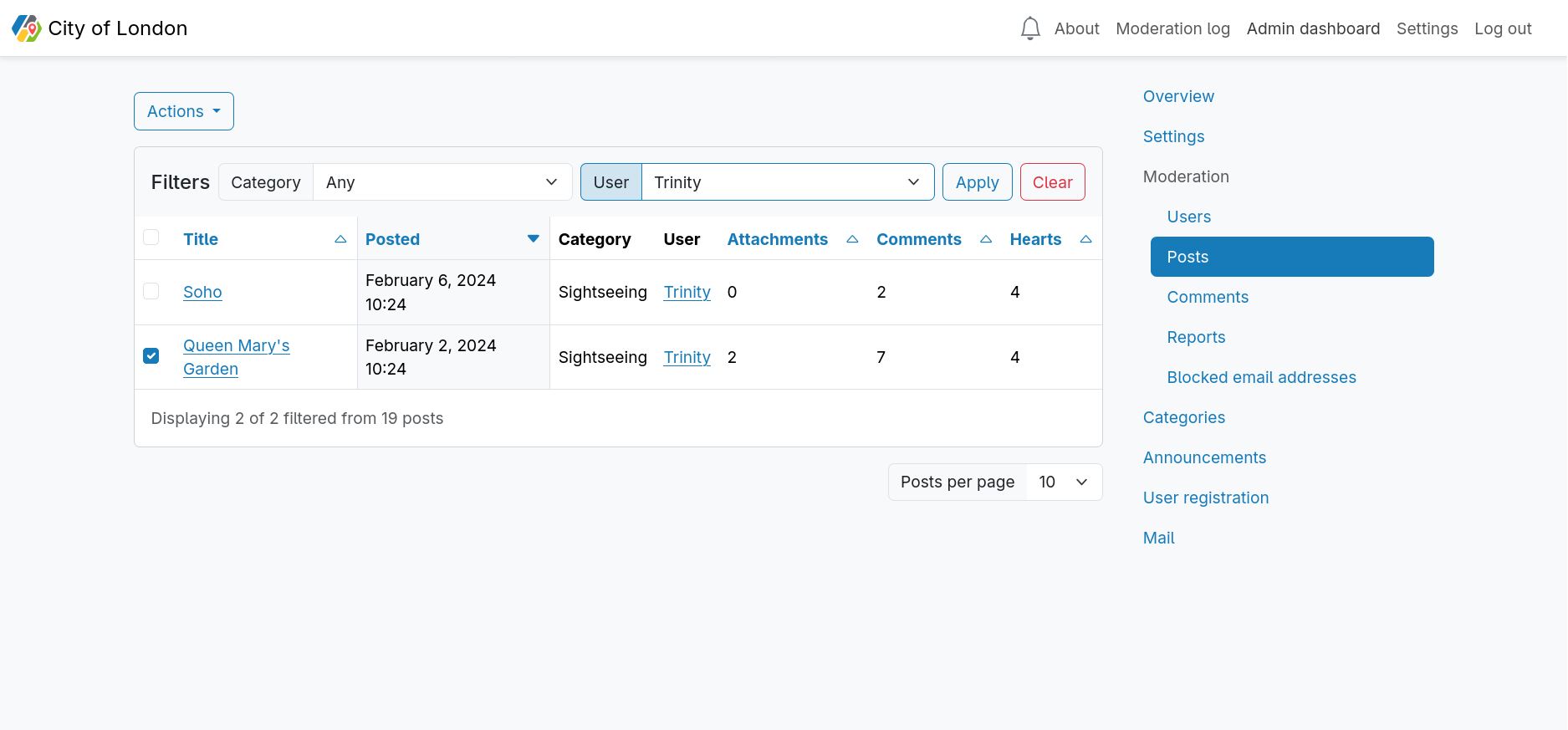
The posts index displays a table of all posts. This table is paginated at 10 posts per page by default, and can be changed to display 25, 50 or 100 posts per page.
Some columns of the posts table can be sorted in ascending or descending order by clicking the column heading.
The posts table displays the following information about each post:
| Column | Sortable | Description |
|---|---|---|
| Title | ✅ | This links directly to the post. |
| Posted | ✅ | The date and time that the post was created. |
| Category | ❌ | The name of the category in which the post exists. |
| User | ❌ | The username of the user who created the post. This links to the user's individual moderation page. |
| Attachments | ✅ | Displays the number of attachments the post has. |
| Comments | ✅ | Displays the number of comments the post has. |
| Hearts | ✅ | Displays the number of hearts the post has. |
The posts table can be filtered by category and/or user.
Changing Categories
If a user has created a post in the wrong category, it is possible to move that post to a different category.
Deleting Posts
DANGER
Deleting a post is permanent and cannot be undone.
Deleting a post also deletes all comments made on that post, and all attached images.
Comment Moderation
The comments index displays a table of all comments. This table is paginated at 10 comments per page by default, and can be changed to display 25, 50 or 100 comments per page.
Some columns of the comments table can be sorted in ascending or descending order by clicking the column heading.
The comments table displays the following information about each comment:
| Column | Sortable | Description |
|---|---|---|
| Comment | ❌ | The body of the comment |
| Posted | ✅ | The date and time that the comment was created. |
| User | ❌ | The username of the user who created the comment. This links to the user's individual moderation page. |
| Post | ❌ | The post on which the comment was made. This links directly to the post. |
The comments table can be filtered by user.
Deleting Comments
DANGER
Deleting a comment is permanent and cannot be undone.
Report Moderation
The reports index displays a table of all unactioned reports. This table is paginated at 10 reports per page by default, and can be changed to display 25, 50 or 100 reports per page.
Some columns of the reports table can be sorted in ascending or descending order by clicking the column heading.
The reports table displays the following information about each report:
| Column | Sortable | Description |
|---|---|---|
| Type | ❌ | Displays whether a user has reported a comment or a post. |
| Date reported | ✅ | The date and time that the report was submitted. |
| Reported by | ❌ | The username of the user who submitted the report. This links to the user's individual moderation page. |
| Reason | ❌ | The reason that the reporting user has decided to submit the report. |
| Context | ❌ | Displays the comment or post that has been reported, and who posted it, linking to the original content. |
The reports table can be filtered by type (comment or post).
Dismissing Reports
DANGER
Dismissing a report is permanent and cannot be undone.
If the report has resulted in the deletion of a post or comment, the associated reports will also be deleted. In the event that a moderator has decided to take no action, they can dismiss the report so that it no longer appears in the reports table.
Blocked Email Address Moderation
The blocked email addresses index displays a table of all blocked email addresses. This table is paginated at 10 blocked email addresses per page by default, and can be changed to display 25, 50 or 100 blocked email addresses per page.
The blocked email addresses table can be sorted in ascending or descending order by clicking the column heading.
Blocking email addresses
Moderators and administrators can block email addresses. When an email address is blocked, it is not possible to create a user account with that email address. The user is not informed that their email address is blocked when attempting to sign up. They will see a message indicating that they should check their emails to verify their email address, but that email will not be sent, and the account will not be created.
INFO
When a user account is banned, their email address is automatically added to the blocked email addresses index.
Unblocking email addresses
Unblocking an email address will delete it from the table, and will allow for that email address to be used when attempting to create an account.